One after another, the Web3.0 mobile wallet has a unique phishing attack method Modal Phishing



We recently discovered a novel phishing technique that can be used to mislead victims about the identity of a connected decentralized application (DApp).
We named this new phishing technique Modal Phishing.
An attacker can send fake fake information to a mobile wallet posing as a legitimate DApp and trick the victim into approving the transaction by displaying misleading information in the modal window of the mobile wallet. This phishing technique is widely used. We communicated with the respective component developers and confirmed that they will release a new authentication API to mitigate this risk.
What is Modal Phishing?
During CertiK's security research on mobile wallets, we noticed that certain user interface (UI) elements of Web3.0 currency wallets could be controlled by attackers to carry out phishing attacks. We named this phishing technique Modal Phishing, because attackers mainly target encrypted wallet modal windows for phishing attacks.
Modals (or modal windows) are frequently used UI elements in mobile applications. Modals are usually displayed on top of the main application window. Such a design is usually used to facilitate users to perform quick operations, such as approving/rejecting transaction requests from Web3.0 currency wallets.
image description
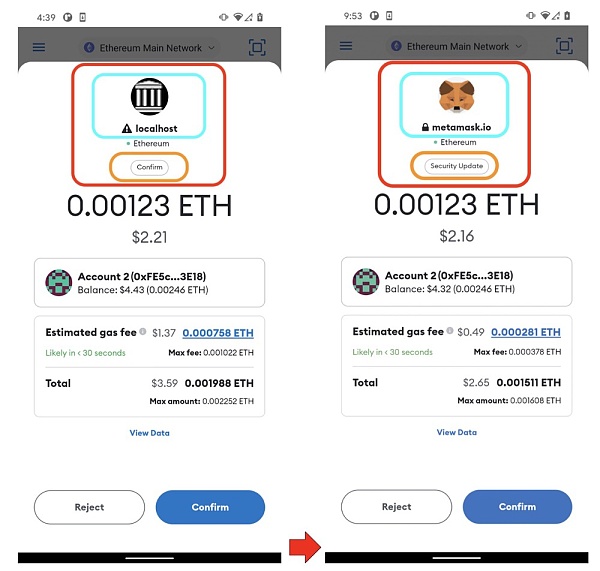
Genuine Deal Approval Model vs. Phishing Deal Approval Model
In the screenshot above, we show how a regular transaction approval modal window appears on Metamask.
When a new transaction request is initiated by the connected decentralized application (DApp), the wallet will display a new modal window and ask the user for manual confirmation.
As shown on the left side of the image above, the modal window usually contains the identity of the requester, such as the website address (localhost in this case), icon, etc. Some wallets like Metamask also display key information about the request, and in the instance we saw some UI elements marked "Confirm" to remind the user that this is a regular transaction request.
However, these UI elements can be controlled by an attacker for Modal Phishing attacks. In the screenshot on the right, we can see that the attacker can change the transaction details and disguise the transaction request as a "Security Update" request from "Metamask" to trick the user into approving it.
As shown in the screenshot, an attacker can manipulate several UI elements.
So in this article we will share two typical cases and identify those UI elements that can be controlled by an attacker.
The details are as follows:
① If the Wallet Connect protocol is used, the attacker can control the DApp information UI elements (name, icon, etc.).
image description
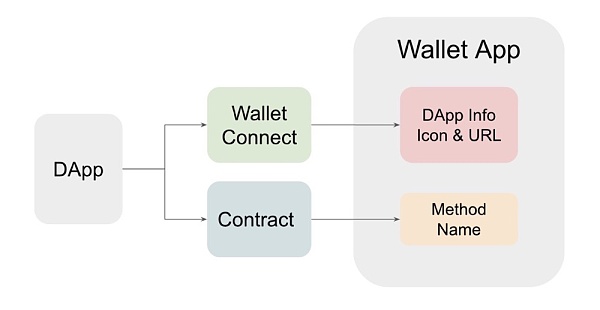
Example of an attacker-controlled Modal and associated information sources (DApp information and method names)
Example ①: DApp phishing attack through Wallet Connect
The Wallet Connect protocol is a popular open-source protocol for connecting users' wallets with DApps via QR codes or deep links. Users can connect their wallets with DApps through the Wallet Connect protocol, and then conduct transactions or transfers with the protocol.
During the pairing process between the Web3.0 currency wallet and the DApp, we noticed that the Web3.0 currency wallet will display a modal window displaying the meta information of the incoming pairing request - including the name of the DApp, website address, icon and describe. The information and methods displayed by the Web3.0 wallet vary according to the DApp name, icon and website address for users to view.
However, this information is provided by DApp, and the wallet does not verify whether the information it provides is legal and authentic. For example, in a phishing attack, a certain Lebi can pretend to be a certain Sprite (both are DApps), and then trick users into connecting with it before the user initiates a transaction request.
Friends can copy the link [https://www.youtube.com/watch? v=x 6 muJmDBC 3 o] to the browser to view a small test made by CertiK.
In the video, CertiK demonstrates how an attacker can “fool” a Uniswap DApp — by claiming to be a Uniswap DApp and connecting to a Metamask wallet, the attacker tricks users into approving incoming transactions.
During the pairing process, a modal window displayed within the wallet presents the name, website URL, and favicon of the compliant Uniswap DApp.
Since the https scheme is used in the URL, a padlock icon is also displayed, which makes the modal window more realistic and legitimate. During the pairing process, as long as the victim wants to perform transaction operations on the fake Uniswap website, the attacker can replace the transaction request parameters (such as destination address and transaction amount) to steal the victim's funds.
Note that although the modal design varies on different wallets, the attacker can always control the meta information.
image description
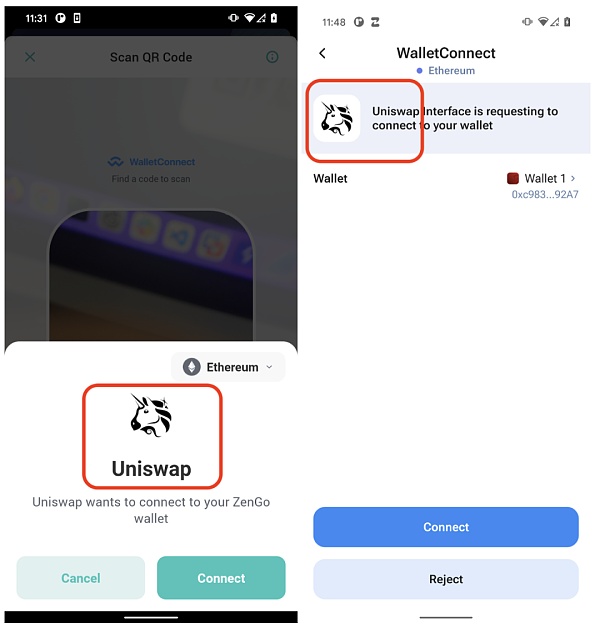
Modal Phishing: Fake DApp Connected to Zengo and 1Inch Wallets
Now that we know that the pairing and transaction modal windows can be manipulated by an attacker, such attacks can be used to convince users that transaction requests are coming from legitimate DApps.
As shown in the screenshot below, we created a fake DApp claiming to be "Metamask" and launched a phishing smart contract. An attacker could impersonate a Metamask or Uniswap DApp in the transaction approval modal.
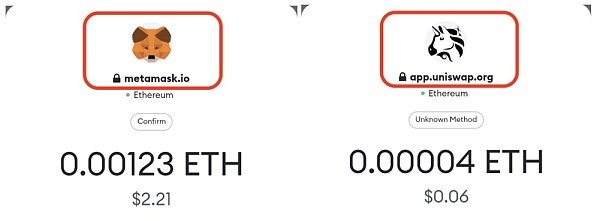
As shown in the above example, the Wallet Connect protocol, which is used on a large scale, does not verify the legitimacy of the paired DApp information. The manipulated meta information is further used by the wallet application and presented to the user, which can be used for Modal Phishing. As a potential solution, the Wallet Connect protocol can verify the validity and legality of DApp information in advance. The developers of Wallet Connect have acknowledged being aware of this issue and are working on a solution.
Example ②: Smart contract information phishing via MetaMask
You may have noticed that under the icon or website name of the Metamask approval modal, there is another view that shows a floating string such as "Confirm" or "Unknown Method". This UI element is designed by Metamask to identify the corresponding transaction type.
image description
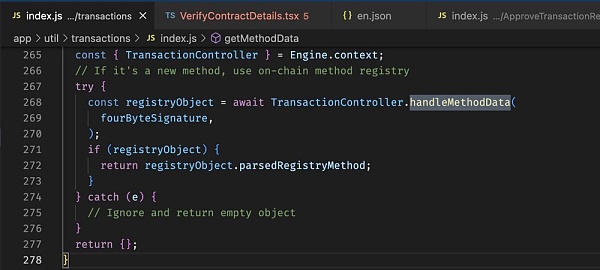
image description
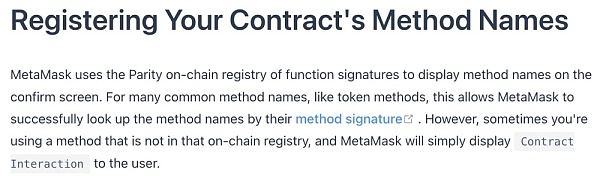
MetaMask's smart contract method name description
We can see a transaction request modal on Metamask labeled "Security Update". The attacker builds a phishing smart contract that has a SecurityUpdate with a payment function and allows the victim to transfer funds into the smart contract.
The attacker also uses SignatureReg to register the method signature as the human-readable string "SecurityUpdate". As mentioned earlier, when Metamask parses this phishing smart contract, it queries the corresponding function method using the function signature bytes and presents it to the user in the approval modal.
image description
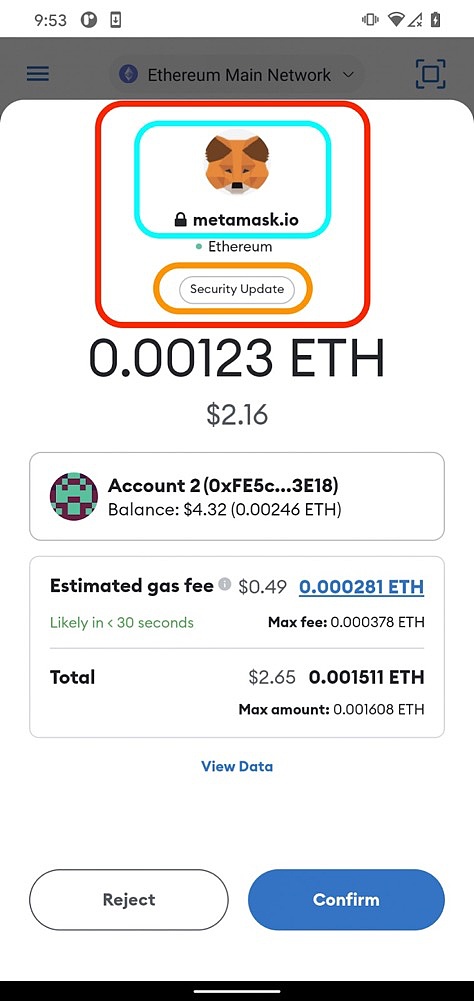
Phishing Transaction Approval Modal
In the example above, we showed how UI elements on the wallet related to smart contract information could be manipulated by phishers.
write at the end
write at the end
In this article, we show you a common UI component on Web3.0 currency wallets that should not be blindly trusted - modal windows.
Certain UI elements in modal windows can be manipulated by attackers to create very "real and convincing" phishing traps. Hence, we named this new phishing technique Modal Phishin.
The root cause of this attack is that the wallet application does not thoroughly validate the legitimacy of the presented UI elements.
For example, the wallet application directly trusts the metadata from the Wallet Connect SDK and presents it to the user.
The Wallet Connect SDK also does not validate the incoming metadata, which in some cases allows the presented metadata to be controlled by an attacker. In Metamask, we can see similar attack principles being abused by attackers to display fraudulent smart contract function method names in modal windows.
Overall, we believe that developers of wallet applications should always assume that incoming data cannot be trusted. Developers should carefully choose which information to display to users and verify the legitimacy of such information. In addition, users should also keep a skeptical attitude towards every unknown transaction request to guard their own "one-acre-three-point land" in terms of security.